Product Overview
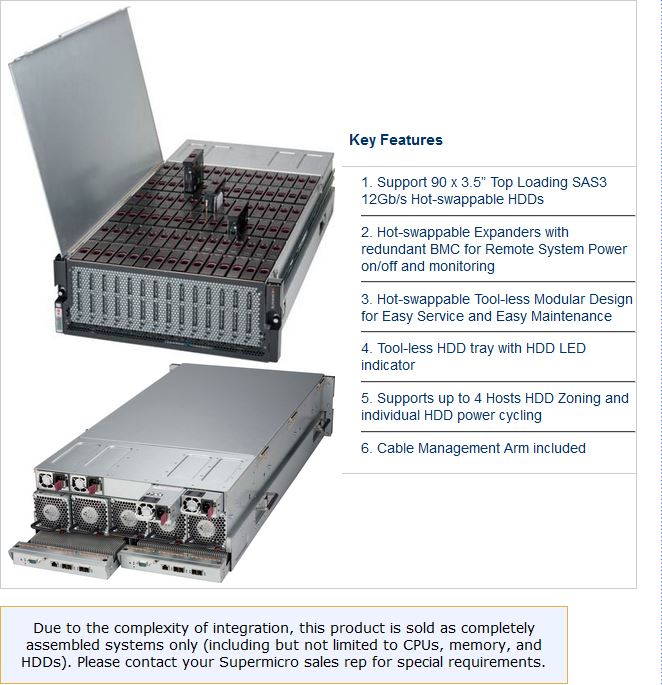
The new 4U JBOD extreme capacity storage chassis (SC946ED-R2KJBOD) supports up to 90x 3.5" 8TB HDDs for 900+TB of SAS3, 12Gb/s performance in an easily serviceable tool-less top-load hot-swap architecture. Chassis features double-slide rails with rear cable management arm for easy access to entire storage bay. HDD trays incorporate HDD LED indicator and tool-less lock/release clip. Dual hot-swap expander modules featuring 4x Mini-SAS HD ports maximize throughput and failover redundancy for media streaming, nearline and archive storage applications. System is easily managed via 2x IPMI port with SNMP for Remote System Power on/off and system monitoring. Supports up to 4 hosts HDD Zoning, independent power cycling of individual HDDs. Green Computing features include advanced cooling via 5x 80mm high speed, low vibration, hot-swappable fans and redundant hot-swap 1000W (2+2) Titanium Level high-efficiency (96%) digital power supplies. Optimized for OpenCloud, OpenStack, High Density Archiving Storage, 4K/8K Raw Media Archive, Streaming Storage, Cloud Backup, Data Replication, Compliance Storage, Video streaming / Surveillance. ***** Due to the complexity of integration, this product is sold as completely assembled systems only (including but not limited to CPUs, memory, and HDDs). Please contact your Supermicro sales rep for special requirements.
Specifications
SuperChassis 847DE26/946ED-R2KJBOD, 90x SAS3 JBOD
Supermicro SC847DE16-R2K02JBOD, 4U JBOD, 90x in 45(24 front+21 rear) HS SAS2 Bays, 1x Exp, 2KW(1+1)
SATA3 Data Volume 1(1 to 10)
10x Seagate ES 1TB/7200 RPM, 128M, 6Gb/s SATA3 HD
SATA3 Data Volume 2(11 to 20)
----------Click to Select SATA3 HD----------
SATA3 Data Volume 3(21 to 30)
----------Click to Select SATA3 HD----------
SATA3 Data Volume 4(31 to 40)
----------Click to Select SATA3 HD----------
SATA3 Data Volume 5(41 to 50)
----------Click to Select SATA3 HD----------
SATA3 Data Volume 6(51 to 60)
----------Click to Select SATA3 HD----------
SATA3 Data Volume 7(61 to 70)
----------Click to Select SATA3 HD----------
SATA3 Data Volume 8(71 to 80)
----------Click to Select SATA3 HD----------
SATA3 Data Volume 9(81 to 90)
----------Click to Select SATA3 HD----------
SAS3 Data Volume 1(1 to 10)
----------Click to Select SAS3 HD----------
SAS3 Data Volume 2(11 to 20)
----------Click to Select SAS3 HD----------
SAS3 Data Volume 3(21 to 30)
----------Click to Select SAS3 HD----------
SAS3 Data Volume 4(31 to 40)
----------Click to Select SAS3 HD----------
SAS3 Data Volume 5(41 to 50)
----------Click to Select SAS3 HD----------
SAS3 Data Volume 6(51 to 60)
----------Click to Select SAS3 HD----------
SAS3 Data Volume 7(61 to 70)
----------Click to Select SAS3 HD----------
SAS3 Data Volume 8(71 to 80)
----------Click to Select SAS3 HD----------
SAS3 Data Volume 9(81 to 90)
----------Click to Select SAS3 HD----------