Product Overview
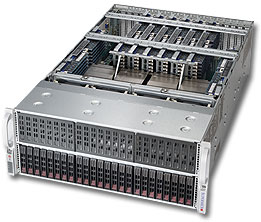
Supermicro's quad-processor Xeon® E7-8800/4800 v3/v4 servers support 11 PCI-E 3.0 and up to 6TB of DDR3 memory in 96 DIMM slots. These servers are designed for enterprise mission critical applications, Cloud Computing, HPC, virtualization, and simulations. Supermicro Note: Due to the complexity of integration, this product is sold as completely assembled systems by SMC only. *****Due to the complexity of integration, this product is sold as completely assembled systems only (including but not limited to CPUs, memory, and HDDs). Please contact your sales rep for special requirements.
Specifications
SuperServer 4048B-TRFT Storage Server
Super 4048B-TRFT,4x E7-4800/8800v4/22C,Video,2x10GB/X540,24~48x2.5" HS SAS3+R,IPMI,D3(6TB),4U/R1620W
Quad Intel® Xeon® E7-4800/8800v3 Processor
2x E7-4809v3-2.0Ghz/8C, 20MB, 6.4GT/s, 115W CPU
Quad Intel® Xeon® E7-4800/8800v4 Processor
----------Click to Select----------
System Memory: Up to 6TB DDR3 1600MHz ECC R/LRDIM
32GB(4x 8GB) D3-1600Mhz, ECC/Reg 240-Pin Sdram
Add-On SATA/SAS Raid Controller
----------Click to Select----------
2.5" SATA Data Volume 1(1 to 8)
8x Seagate ES 1TB/7200 RPM,64M,6Gb/s,2.5" SATA3 HD
2.5" SATA Data Volume 2(9 to 16)
----------Click to Select----------
2.5" SATA Data Volume 3(17 to 24)
----------Click to Select----------
2.5" SATA Data Volume 4(25 to 32)
----------Click to Select----------
2.5" SATA Data Volume 5(33 to 40)
----------Click to Select----------
2.5" SATA Data Volume 6(41 to 48)
----------Click to Select----------
2.5" SAS Data Volume 1(1 to 8)
----------Click to Select SAS3 HD----------
2.5" SAS Data Volume 2(9 to 16)
----------Click to Select SAS3 HD----------
2.5" SAS Data Volume 3(17 to 24)
----------Click to Select SAS3 HD----------
2.5" SAS Data Volume 4(25 to 32)
----------Click to Select SAS3 HD----------
2.5" SAS Data Volume 5(33 to 40)
----------Click to Select SAS3 HD----------
2.5" SAS Data Volume 6(41 to 48)
----------Click to Select SAS3 HD----------
Optical Drive
----------Click to Select----------
MicroSoft Operation System
----------Click to Select----------
Red Hat Linux Operation System
----------Click to Select----------
VMware Operation System
----------Click to Select----------